
This simulation was programmed on Gemini AI and is quite detailed
Solar system simulator – Click to visit
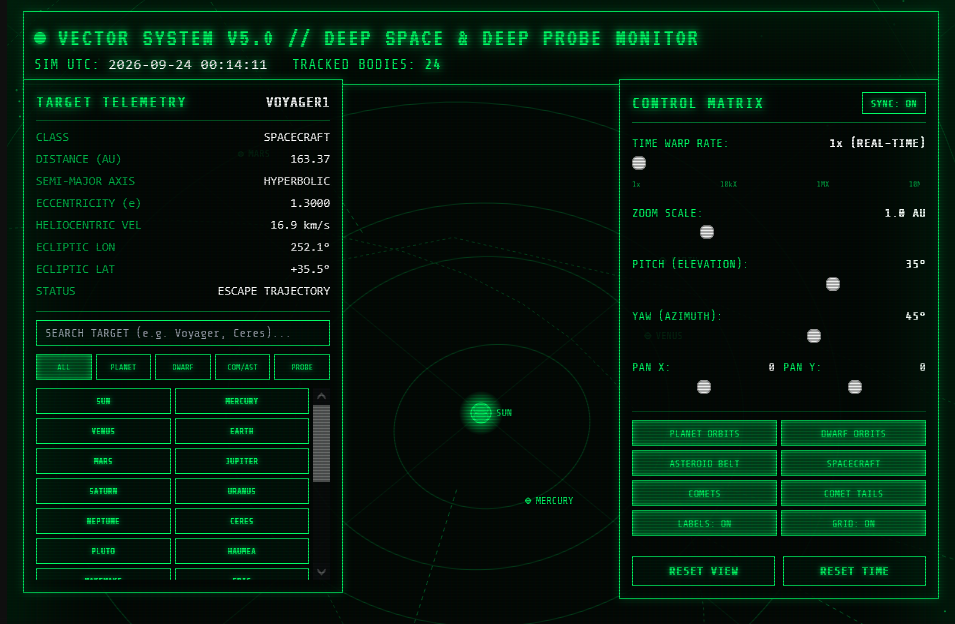
Building an Interactive 3D Solar System Simulator with AI
This web-based 3D Vector Solar System Simulator demonstrates how generative AI can transform complex physical formulas and astronomical data into a single-file, interactive HTML application with a classic 1980s vector-graphics aesthetic.
1. How It Works
The entire application runs directly in the browser using plain HTML5 Canvas and JavaScript—requiring no external libraries, engines, or frameworks.
- 3D-to-2D Vector Engine: Instead of heavy WebGL renders, the application calculates 3D space positions (X,Y,Z) using standard trigonometry and projects them onto a 2D screen using perspective transformation matrices.
- Keplerian Orbital Mechanics: The motion of the celestial bodies is governed by Kepler’s Laws of Planetary Motion. Instead of simple circular paths, the engine solves Kepler’s Equation (M=E−esinE) iteratively using Newton-Raphson numerical methods. This accurately models elliptical paths, orbital inclinations, longitudes of ascending nodes, and varying orbital velocities (moving faster near perihelion and slower at aphelion).
- Retro CRT Aesthetic: The visual style simulates classic green-monochrome vector radar displays using multi-layered canvas glows, CRT scanlines, wireframe grid planes, and glowing particle tails.
2. How the Astronomical Data Is Used
The simulation relies on real astronomical parameters derived from NASA’s JPL J2000 Keplerian Elements:
- Real-Time Synchronisation: When opened, the program reads the system clock and computes the exact elapsed days since the J2000 epoch (January 1, 2000). It calculates where the planets, dwarf planets, comets, and space probes are positioned relative to one another in real time.
- Comprehensive Celestial Catalog:
- Planets & Moons: All 8 major planets plus the Earth-Moon system.
- Dwarf Planets & Asteroids: Pluto, Ceres, Eris, Haumea, Makemake, along with major asteroids like Vesta and Pallas.
- Comets: High-eccentricity comets (including 1P/Halley, Hale-Bopp, and 67P) with dynamic vector tails that automatically point away from the Sun and flare up near perihelion.
- The Main Asteroid Belt: A procedural field of over 600 individual asteroids rendered between Mars and Jupiter, complete with realistic Kirkwood Gaps caused by Jupiter’s gravitational resonances.
- Space Probes: Deep-space missions like Voyager 1 & 2, Pioneer 10 & 11, and New Horizons tracking hyperbolic heliospheric escape trajectories out past 160 AU.
3. How to Use the Simulation
- Time Warp Controls: Adjust the speed slider from 1x (real-time speed) up to 10,000,000x to watch inner planets spin around the Sun or observe long-period comet orbits in seconds. Click Sync Real-Time to jump back to current UTC time.
- View & Camera Adjustments:
- Rotate: Left-click and drag anywhere on the view, or adjust the Pitch/Yaw sliders.
- Pan: Right-click and drag (or use Pan X/Y sliders) to shift the camera focus.
- Zoom: Use the mouse scroll wheel or Zoom slider to zoom from inner solar system views up to the outer Kuiper belt and heliosphere.
- Targeting & Telemetry: Click on any planet, comet, or spacecraft in the viewport (or select it from the sidebar search/filter tabs) to lock the crosshairs on it. The HUD telemetry panel will display its live distance in Astronomical Units (AU), current velocity, orbital period, and ecliptic coordinates.